Home / Guides / How to Read a Betting Slip
How to read a betting slip and bet confirmation
Every field explained, so nothing on the screen surprises you after you've already tapped confirm.
On this page
The anatomy of a bet slip
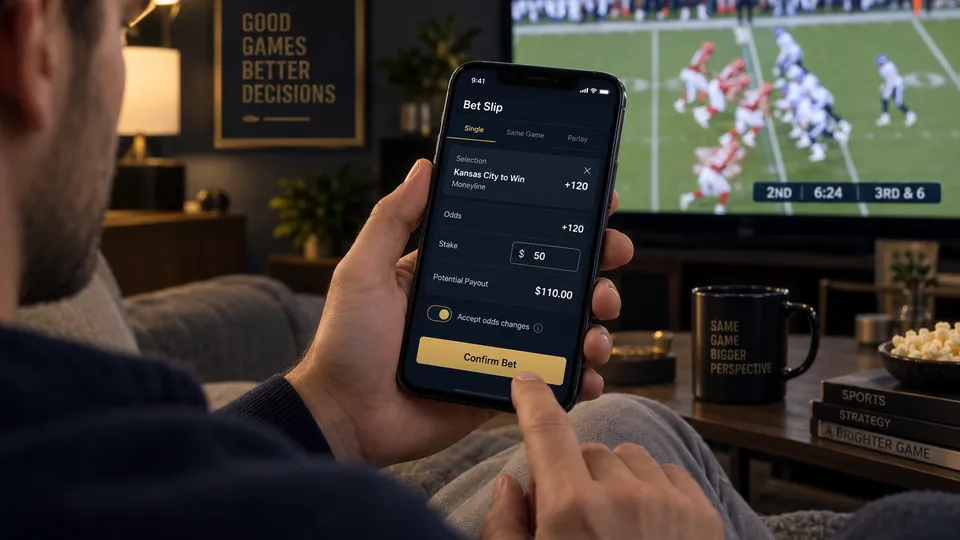
When you tap odds on any market, that selection is added to your bet slip - a panel, usually accessible from a persistent icon or tab, that summarizes everything you're about to wager before you confirm anything. A typical slip line shows the specific selection (team, player, market type), the odds at the moment you added it, and a field to enter your stake. Nothing is wagered, and no money leaves your account, until you explicitly confirm the slip - browsing and adding selections carries zero risk on its own.
Stake and potential payout
Once you enter a stake, the slip updates in real time to show your total potential payout (your profit plus your original stake returned) if the bet wins. Some apps show potential profit and total payout as separate numbers; others show only the total payout. Read carefully which figure you're looking at before assuming a number represents pure profit - a $50 bet at +150 shows a "payout" of $125 (your $50 stake plus $75 profit), not $125 in profit alone.
"Odds have changed" prompts
Because prices update continuously, especially close to game time or during live betting, you'll sometimes see a prompt when confirming a bet that the odds have moved since you added the selection to your slip. Most sportsbooks let you set an "accept odds changes" preference - either accepting any change automatically, accepting only changes in your favor, or requiring manual confirmation of any change at all. New bettors are generally better served by the manual-confirmation or favorable-only settings until they're comfortable with how often and how much prices can move in the seconds between adding a bet and confirming it.
Multi-bet slips: parlay vs. straight toggle
When you have more than one selection on your slip, most sportsbooks display a toggle letting you choose whether to place them as separate straight bets (each with its own independent stake and payout) or combined into a single parlay (one stake, one combined payout, requiring every leg to win). This toggle is easy to overlook, and mistakenly leaving several selections combined into a parlay when you meant to place them as separate straight bets - or vice versa - is one of the more common slip mistakes new bettors make. Always check which mode is selected before confirming a slip with more than one pick on it.
Reading your bet confirmation
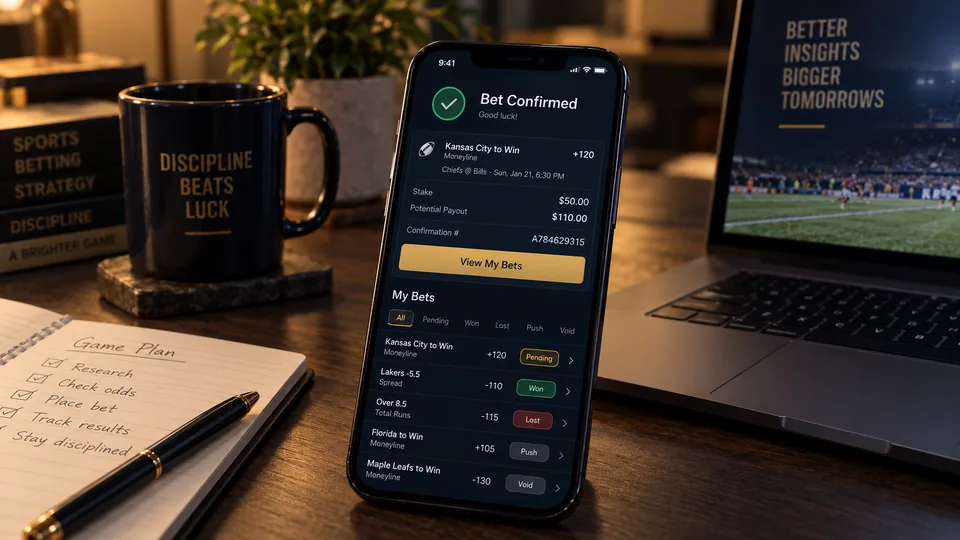
After confirming, you'll see a confirmation screen or notification summarizing exactly what was placed: the selection, the odds you were paid at (which may differ slightly from what you saw seconds earlier if a change was accepted), your stake, and your potential payout. This confirmation, along with your bet history, is your record of exactly what you wagered - worth a quick glance every time, particularly on multi-leg slips, to confirm nothing was added or toggled unintentionally.
Checking bet history and status
Every sportsbook keeps a running bet history, usually accessible from an account or "my bets" tab, showing all your pending, settled, and (where applicable) cashed-out wagers. Pending bets show as open until the relevant event finishes and the result is verified; settled bets show as won, lost, pushed (refunded due to a tie against the line), or void (refunded due to a cancellation or postponement). This is the definitive record to check if you're ever unsure whether a bet actually went through or how it settled - more reliable than trying to remember what you tapped in the moment.
Common slip mistakes to watch for
- Leaving old selections on the slip. A selection from an earlier browsing session can sit on your slip until removed - always review the full slip, not just the newest addition, before confirming.
- Misreading parlay vs. straight mode, as covered above - this is the single most common structural mistake.
- Entering the stake in the wrong field on a multi-leg straight-bet slip, where each leg may have its own stake box rather than one shared stake.
- Not noticing an odds-change prompt and confirming a materially worse price than intended.
FAQ
Can I remove a selection from my bet slip before confirming?
Yes - selections can be removed individually from the slip at any point before you tap the final confirm button, with no cost or penalty.
What happens if I accidentally confirm the wrong bet?
Confirmed bets generally can't be canceled or edited; some books offer a "cash out" option to settle the bet early at an adjusted price, but that's different from a true cancellation and isn't available on every bet type.
Why did my payout show a different number than I expected?
Double-check whether the displayed figure is total payout (stake plus profit) or profit alone - apps label this differently, and misreading which one you're looking at is a common source of confusion.